# Which Graph scopes does Cronofy utilize?
Cronofy utilizes Microsoft's Graph API to access Exchange and Office365 data about *Users, Organizations, Resources* and their *Calendar* data.
When a user is authenticating themselves via Individual Connect, Cronofy requests access to their profile and their calendar.
When using Enterprise Connect to connect your organization, Cronofy requests access to list users & resources, organization information, and calendars.
This is done via the [Cronofy Enterprise for Office 365](https://appsource.microsoft.com/en-us/product/web-apps/cronofyltd1589543811684.cronofy-enterprise-365-connector?tab=Overview) application.
We are also able to connect with less permissive scopes which give Cronofy access to only the Free/Busy information of a user's calendar.
## Individual Connect
Cronofy requests the following scopes from individuals when connecting via the **Cronofy for Office 365** application (Application ID `f573e3d3-ea9c-4d8d-9d8f-20107b8cedbd`) for Individual Connect.
Delegated Scopes
User.Read
Calendars.ReadWrite
offline_access
## Enterprise Connect
Cronofy requests the following scopes when connecting via the **[Cronofy Enterprise for Office 365](https://appsource.microsoft.com/en-us/product/web-apps/cronofyltd1589543811684.cronofy-enterprise-365-connector?tab=Overview)** application (Application ID `10bb7e5b-b80b-4e6e-a209-f78581dbc79e`) for Enterprise Connect.
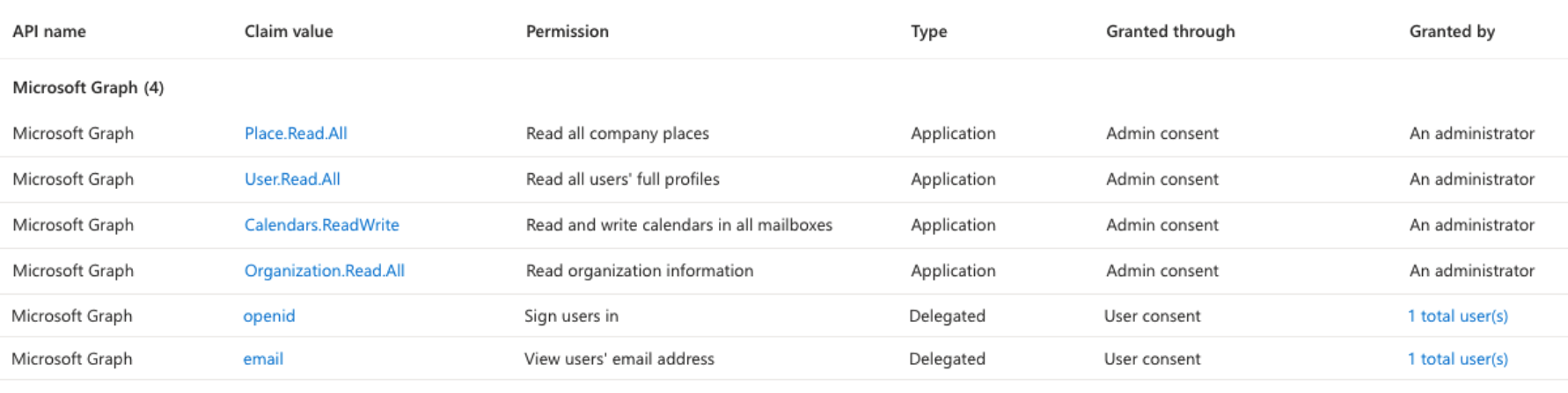
- Application Scopes
- User.Read.All
- Organization.Read.All
- Place.Read.All
- Calendars.ReadWrite
- Delegate Scopes
- openid
- email
## Individual Connect (Free/Busy)
Cronofy requests the following scopes when connecting via the **Cronofy for Office 365 - Free/Busy** application (Application ID `5dedab78-ec49-4da1-9909-f943f131d7f1`) for Individual Connect Free/Busy.
- Delegated Scopes:
- Calendars.ReadBasic
- User.Read
- offline_access
## Enterprise Connect (Free/Busy)
Cronofy requests the following scopes when connecting via the **Cronofy Enterprise for Office 365 - Free/Busy** application (Application ID `9437e0a7-15ef-46bd-9106-da9b1477234d`) for Enterprise Connect Free/Busy.
- Delegated Scopes:
- Calendars.ReadBasic
- User.Read
- offline_access
# Scopes
### User.Read
[Microsoft API doc](https://learn.microsoft.com/en-us/graph/permissions-reference#userread)
Individual Connect requires `User.Read` to be able to access profile information, such as the user's email and name, which is needed to allow Cronofy to act on behalf of the user.
### User.Read.All
[Microsoft API doc](https://learn.microsoft.com/en-us/graph/permissions-reference#userreadall)
Enterprise Connect requires `User.Read.All` to be able to access profile information, such as the user's email and name, which is needed to allow Cronofy to act on behalf of the users in the organization.
### Organization.Read.All
[Microsoft API doc](https://learn.microsoft.com/en-us/graph/permissions-reference#userreadall)
Cronofy requires `Organization.Read.All` to identify the domains used by the organization when connecting via Graph Enterprise Connect.
We also make use of the ID field which allows us to able to uniquely identify the tenant within Graph.
> **INFO:** **Why not `User.ReadBasic.All`?**
[User.ReadBasic.All](https://learn.microsoft.com/en-us/graph/permissions-reference#userreadbasicall) does not return certain fields that are required for Cronofy to sync account details.
Notably we have found `preferredLanguage`, `userType`, and `accountEnabled` fields are omitted from the user object.
We have also found that we are unable to query against a users `proxyAddresses` (email aliases), which is used in account resolution.
### offline_access
[Microsoft API doc](https://learn.microsoft.com/en-us/graph/permissions-reference#offline_access)
Individual Connect requires `offline_access` to be able to explicitly request a refresh token for the delegated permissions. Without `offline_access`, the app would only get short-lived access tokens, and will cause failures once the token expires.
### Place.Read.All
[Microsoft API doc](https://learn.microsoft.com/en-us/graph/permissions-reference#placereadwriteall)
Cronofy requires `Places.Read.All` to view conference rooms and room lists when creating and reading calendar events.
### Calendars.ReadWrite
[Microsoft API doc](https://learn.microsoft.com/en-us/graph/permissions-reference#calendarsreadwrite)
Cronofy requires `Calendars.ReadWrite` to create, read, update, and delete events in user and room calendars.
### Calendars.ReadBasic
[Microsoft API doc](https://learn.microsoft.com/en-us/graph/permissions-reference#calendarsreadbasic)
Cronofy requires `Calendars.ReadBasic` to access the Free/Busy schedule for a given user.
### openid
[Microsoft API doc](https://learn.microsoft.com/en-us/graph/permissions-reference#openid)
Cronofy uses the `openid` scope to verify the account of the person completing the authorization.
### email
[Microsoft API doc](https://learn.microsoft.com/en-us/graph/permissions-reference#email)
Cronofy uses the email scope to identify the user who is completing the Enterprise Connect authorization flow.
## What are my options for restricting access?
Connecting with Read-Write permissions provides the most seamless experience, we are able to create events directly in the calendar, and make use of integrated Microsoft Teams conferencing, if it is available.
When privacy is a concern, we now provide the Free/Busy Calendar Access Mode (see our docs on connecting [Office 365 Enterprise Connect Free/Busy](/calendar-admins/enterprise-connect-office365-graph/free-busy-access-mode/index.md)), whereby only the Free/Busy information from a user's schedule is granted to Cronofy. See the Microsoft documentation for the [getSchedule API](https://learn.microsoft.com/en-us/graph/api/calendar-getschedule).
When connecting via Individual Connect Free/Busy, Microsoft return to us all the properties of the [scheduleitem](https://learn.microsoft.com/en-us/graph/api/resources/scheduleitem) resource, however, the only properties we store are `status` and `start` and `end` times.
When connecting via Enterprise Connect Free/Busy, due to the way the permissions work, Microsoft only return to us the `status` and `start` and `end` times of each event.
You may limit which user's data Cronofy is able to access by following [the Enterprise Connect guide](/calendar-admins/enterprise-connect-office365-graph/restrict-data-access/index.md).
## Further reading
Further information about the above listed scopes can be found at [Microsoft Graph permissions reference](https://docs.microsoft.com/en-us/graph/permissions-reference)
---
[Read in HTML](/calendar-admins/enterprise-connect-office365-graph/which-graph-scopes-does-cronofy-utilize/)