Managing Admin API Keys PRERELEASE
Read as MarkdownIn order to provision applications via an API call, you need to first create an Admin API Key.
How to create Admin API Keys #
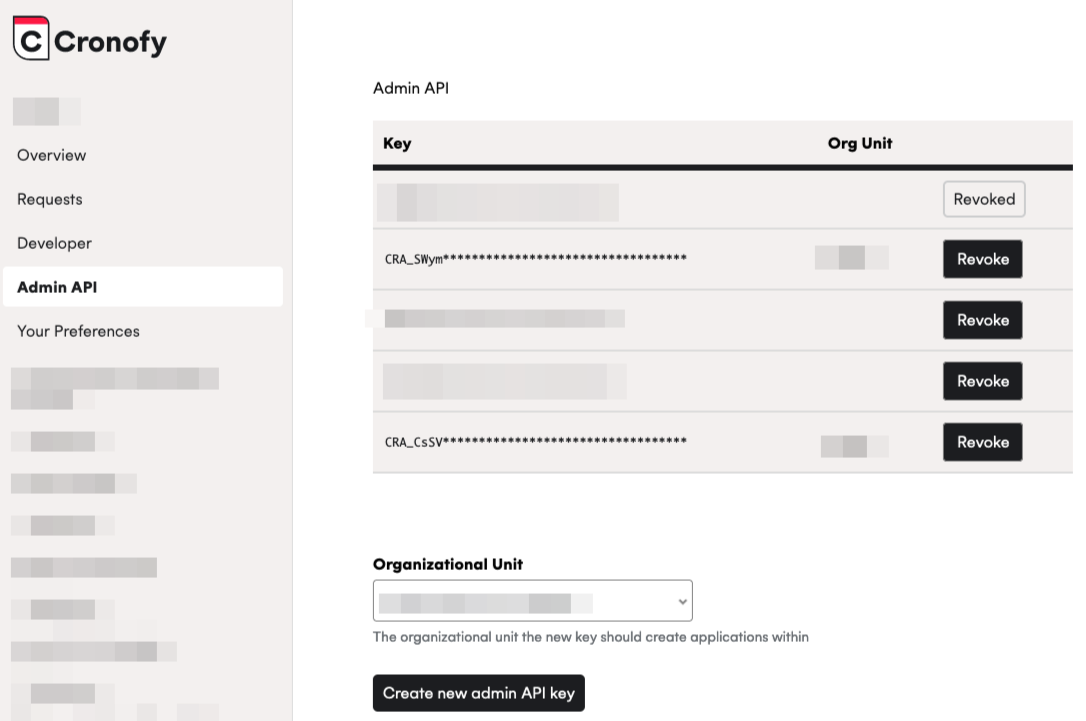
To create an Admin API Key, you need to:
- Log into your Cronofy account.
- Navigate to the
Admin APIsection in the menu. - Select the Organizational Unit in which you want to create applications in.
- Click
Create new Admin API key.
How to revoke Admin API Keys #
You can revoke an Admin API Key by:
- Log into your Cronofy account.
- Navigate to the
Admin APIsection in the menu. - Click
Revokenext to the Admin API Key that you wish to revoke. The key will no longer be valid to make Admin API requests with.